Good To Stargaze
Good To ForecastWeather
3.785.00 Reviews
- Version
- 2.10.1
- Installs
- 50.00K
- Age Rating
- Everyone
Screenshots
Our Review of Good To Stargaze
 Analysis by Appyee
I like astronomy, but I don’t always know whether a clear-looking evening will actually make for a worthwhile look at the sky. That practical question is where Good To Stargaze makes sense: it is a weather app built around observing conditions, with seeing, transparency, and light pollution in the picture too. I’d treat it as a planning companion rather than a replacement for a general forecast or a complete astronomy reference. Its most useful promise is helping me decide whether to head outside, not guaranteeing a perfect view.
Who will get the most from it
The app is a good fit if you already enjoy looking at the night sky but want a more deliberate way to choose a time and place. A casual observer can use it to avoid setting up a telescope on a poor night; someone learning astronomy can use the planning process to build a regular habit. It is also useful for families or friends who want to make an evening outdoors feel purposeful, even if nobody owns specialist equipment.
I would not make it my only weather app. If I need a broad picture of tomorrow’s rain, commute conditions, or severe weather, a conventional forecast is the more natural first stop. Good To Stargaze is aimed at a narrower decision: whether the conditions are promising for observing. That focus is valuable, but it also means it works best alongside common sense and a general forecast, especially when the weather could change before I get outside.
A practical first outing
For a first useful test, I’d choose a familiar evening rather than plan a special trip around the app. Check the conditions before sunset, then compare the outlook with what you can actually see from your window or yard once it gets dark. If the sky is promising, step outside for a short look before carrying equipment to a distant spot. This small trial helps you learn how the forecast relates to your own surroundings without turning a disappointing night into a major effort.
For example, imagine you have an hour free after dinner and are debating whether to bring a telescope into the garden. The app can help you think beyond “there are no clouds right now”: seeing and transparency matter to the quality of the view, while local light pollution affects how much of the sky is visible. I’d use those factors together, then make a simple decision about whether a quick naked-eye session is worthwhile or whether a telescope setup can wait for another evening.
Making the forecast useful
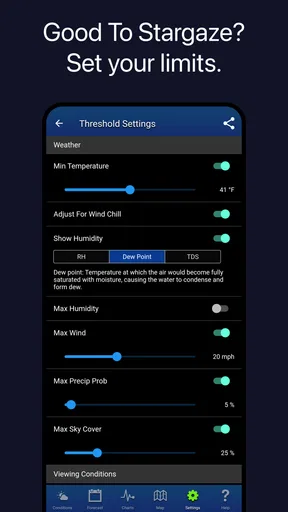
A helpful habit is to check the outlook before you commit to travel, not only when you are already standing outside. Conditions that look adequate for a relaxed look from home may not justify driving to a darker location or arranging an outing with other people. I’d set a personal threshold: a modest forecast can still be fine for spotting familiar bright objects, while a more demanding observing plan deserves a better combination of conditions.
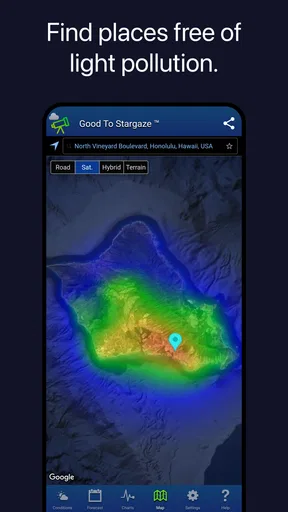
It is also worth separating the sky’s clarity from the darkness of your location. A clear view above a brightly lit neighborhood is not the same experience as a clear view from a darker area. The app’s attention to light pollution makes that distinction relevant, but it cannot make streetlights disappear; choosing a safe, accessible spot remains your responsibility. If you are new to observing, start somewhere familiar and use the app to guide expectations rather than treating any single indicator as a promise.
Good To Forecast, the developer behind the app, has kept the idea focused on the conditions that matter to stargazers. It is free to install and is rated for Everyone, which makes trying it a low-commitment option for curious newcomers. The app has a 3.6 average from around 638 ratings, so I’d approach it as a specialized tool worth testing against your own routine rather than assuming it will suit every observer.
Getting Started with Good To Stargaze
First things first, let’s talk about setting up Good To Stargaze. The app is super intuitive right from the get-go. After downloading, I was greeted with a sleek interface that made navigating through its features a breeze. The initial setup was as simple as entering your location or allowing the app to access your GPS. This is crucial because it helps tailor the stargazing experience to your specific spot on Earth.
Features That Shine
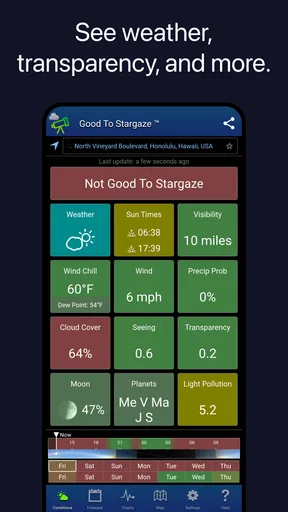
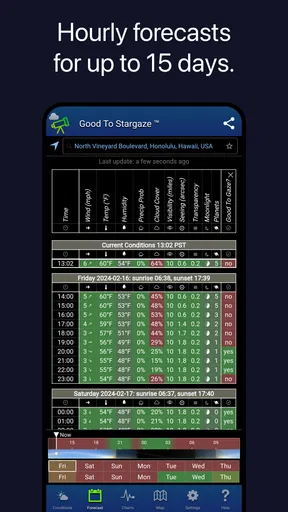
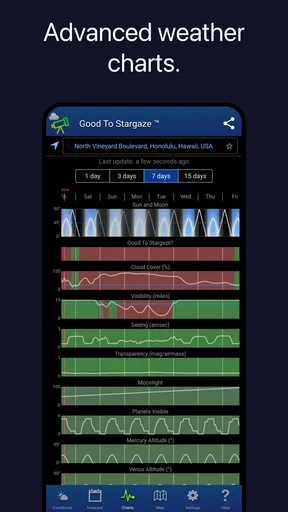
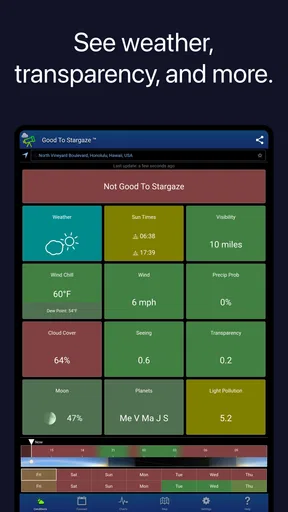
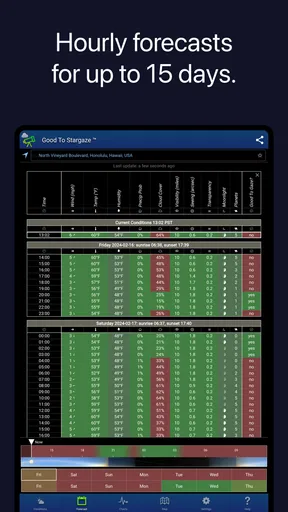
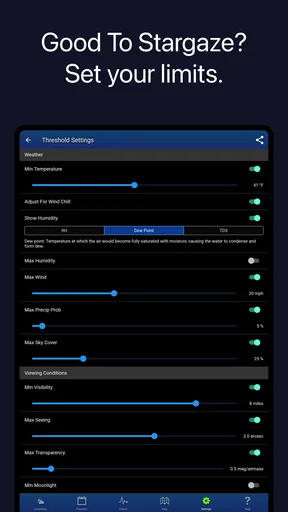
One of the standout features is the weather forecast for stargazing. You know those nights when you plan to observe the stars, only to be thwarted by unexpected clouds? Good To Stargaze eliminates that frustration with its detailed weather reports. It gives you a heads-up on humidity, wind speed, and visibility conditions, ensuring you pick the perfect night to set up your telescope.
Then there’s the night sky calendar. This feature is like having an astronomical diary. It highlights upcoming celestial events, like meteor showers and eclipses, so you never miss a cosmic show. I found myself planning my nights out in the backyard based on this calendar, and it was absolutely worth it.
User Experience and Design
Now, let’s chat about the user experience. The design is clean, with a dark mode that’s easy on the eyes during night-time use. It’s clear that the developers put thought into creating a user-friendly experience. The app is responsive, and I never encountered any lag, even when exploring more data-heavy sections like star charts.
The star chart feature deserves a special mention. It’s interactive and allows you to point your phone at the sky to identify stars and constellations. This was particularly fun to use with friends and family. We spent hours trying to spot and name constellations, and it’s safe to say, we learned a lot!
Educational Insights
Another aspect of Good To Stargaze that I found incredibly valuable is its educational content. The app doesn’t just show you the stars; it teaches you about them. For each celestial body you click on, there are detailed descriptions, historical facts, and scientific data. This feature turned my stargazing sessions into mini astronomy lessons, making the experience both entertaining and educational.
What to keep in mind
Even a useful forecast has limits. I would not read a promising outlook as a guarantee that every target will be easy to see: the experience depends on your exact location, the view around you, and what you hope to observe. A beginner looking for a relaxed tour of familiar constellations can be happy with an imperfect night, while someone trying to make a careful observation may want to wait for more favorable conditions. That difference is why I find the app most helpful as a decision aid, not as an authority that makes the decision for me.
There is also a practical trade-off in location setup. Using a location that accurately reflects where you plan to observe makes the forecast more relevant; checking from home and later traveling elsewhere can leave you planning around the wrong patch of sky. If you change locations for a session, revisit the forecast for the place you will actually use. That simple step is more useful than repeatedly checking the same home view while assuming it applies everywhere nearby.
The app’s current version is 2.9.39, and it supports devices running Android 7.0 or later. In-app purchases range from $1.99 to $109.99 per item, so I’d look carefully at any paid option before buying and decide whether it addresses a real need in your observing routine. You can start with the free app and see whether its planning approach is useful before considering spending anything.
Final Thoughts
In conclusion, Good To Stargaze is more than just an app; it’s a gateway to the wonders of the universe. Its combination of practical features and educational insights makes it a must-have for anyone interested in astronomy. Whether you're a seasoned stargazer or a curious newbie, this app provides all the tools you need to explore the night sky like never before. So, grab your phone, download the app, and let the stars be your guide!
My recommendation is a little more specific: try it if you want to make better-informed choices about when to observe, and give it a few ordinary evenings before relying on it for a special outing. It is less compelling if you only need a standard local forecast or expect an app to remove the uncertainty that comes with outdoor observing. For a curious first-timer, though, pairing its conditions-focused planning with a short, low-pressure look outside is a reassuring way to begin.
Verdict
Strengths of Good To Stargaze
- User-friendly interface for easy navigation.
- Accurate weather forecasts for stargazing.
- Customizable alerts for optimal conditions.
- Offline mode available for remote areas.
- Includes astronomy tips for beginners.
Limitations of Good To Stargaze
- Limited features in the free version.
- Occasional slow updates on weather data.
- Requires GPS for precise location data.
- No integration with telescope apps.
- Ads can be intrusive in free version.
Other Releases by Good To Forecast
View All
UAV Forecast for Drone Pilots
Weather4.1
Similar Picks in This Category
View All
Weather - By Xiaomi
Xiaomi Inc.4.1

Weather & Radar Forecast
WetterOnline4.8

Weather
OneLouder Apps4.6

AccuWeather: Weather Radar
AccuWeather3.6

The Weather Channel - Radar
The Weather Channel4.6

1Weather Forecasts & Radar
OneLouder Apps4.3
Frequently Asked Questions
What is Good To Stargaze, and how does it work?
Good To Stargaze is an app designed for astronomy enthusiasts and casual stargazers. It provides real-time data about weather conditions, cloud cover, and visibility to help users determine the best times for stargazing. By using GPS data, it ensures that users receive accurate, location-specific information to plan their stargazing sessions effectively.
Is Good To Stargaze available for both Android and iOS devices?
Yes, Good To Stargaze is available for download on both Android and iOS platforms. Users can find it on the Google Play Store and the Apple App Store, making it accessible to a wide range of smartphone users who are interested in exploring the night sky.
Does Good To Stargaze require an internet connection to function?
Good To Stargaze requires an internet connection to update weather data and provide the most accurate stargazing conditions. However, once the data is downloaded, users can access the information offline. This feature is particularly useful for stargazers located in remote areas with limited connectivity.
Are there any in-app purchases or subscriptions in Good To Stargaze?
Good To Stargaze may offer in-app purchases or subscription options to unlock premium features, such as advanced weather tools or ad-free experiences. Users should review the app’s details on the app store to understand the available features and any associated costs before downloading.
How user-friendly is the Good To Stargaze interface for beginners?
Good To Stargaze is designed with a user-friendly interface, making it accessible for both beginners and experienced stargazers. The app provides clear instructions and intuitive navigation to help users quickly find the information they need, ensuring an enjoyable and educational stargazing experience for all skill levels.
